Create a Club
A club keeps the records of a tournament that occurs each year. The club shows the all-time stats of each player, the pairing records, the head-to-head records, and the cup history.
info
You must be a Pro member to create a club.
Create a club
- On the home screen, tap the clubs button (
). If you do not have a club, tap Start a club. - Tap Create Club (
). - Tap Club Name and enter the name of the club.
- Tap Tournaments.
- Tap Add Tournament, then tap a tournament. Do this step again for each tournament.
- Go back to the New Club screen and tap Save.
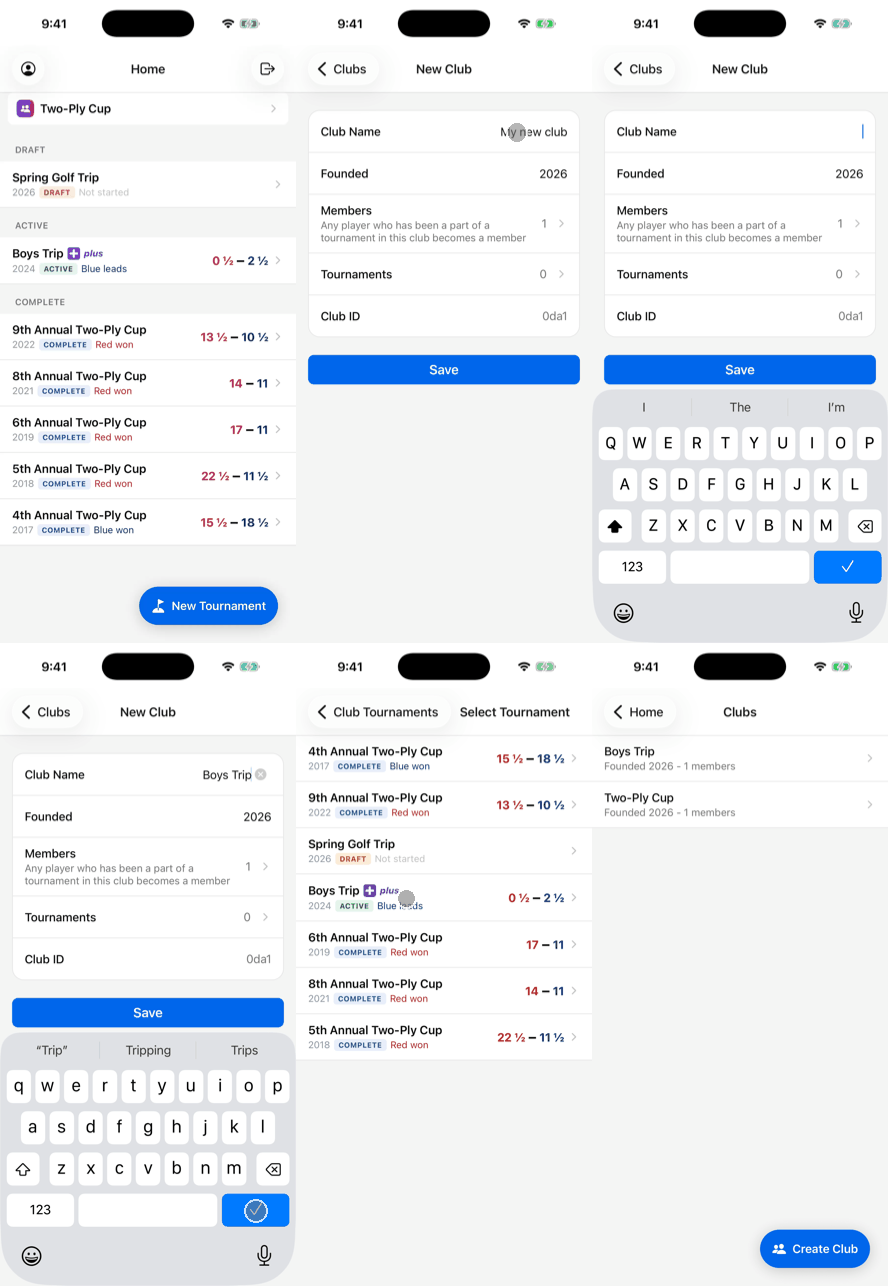
Each player in a tournament of the club becomes a member of the club.
Change a club
You can add tournaments to the club or remove tournaments from the club at any time.
- On the Club Home screen, tap the edit button (
). - Tap Tournaments.
- To add a tournament, tap Add Tournament. To remove a tournament, swipe left on the tournament and tap Delete.
When you remove a tournament from the club, Two Up does not delete the tournament.