Start the Tournament
Players cannot enter scores until the tournament is Active. A new tournament is a Draft until you start it.
Start the tournament
- On the Edit Tournament screen, tap the wrench button (
). - Tap Start Tournament (
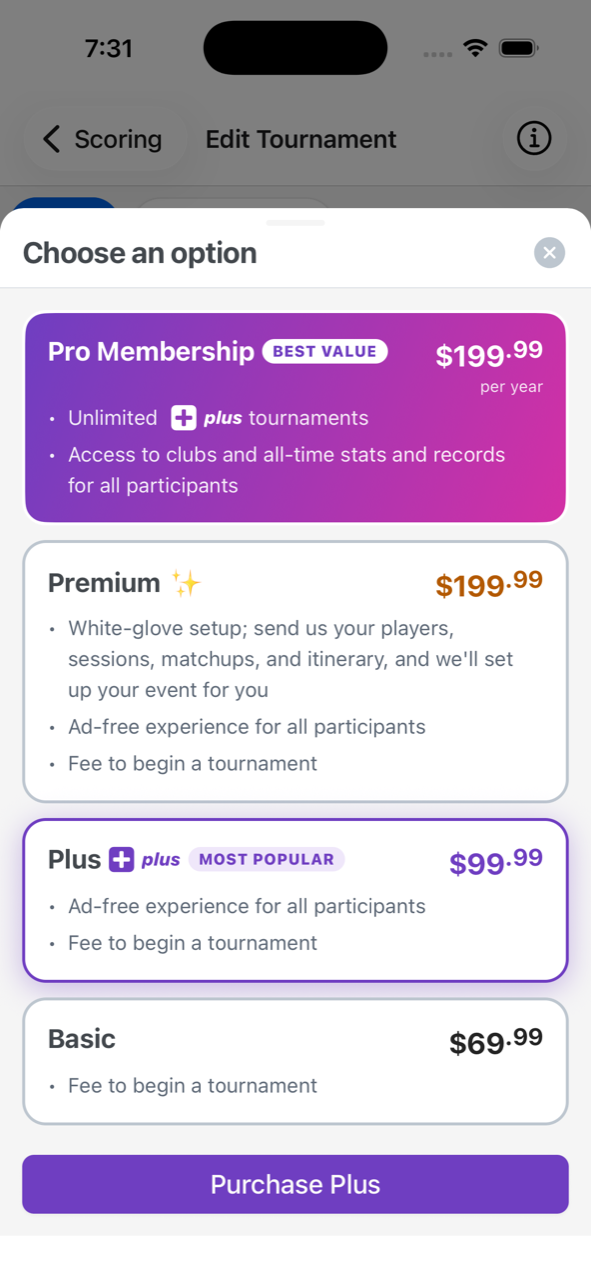
). - If you did not pay for the tournament yet, Two Up shows Choose an option. Select a tournament level, then tap Purchase. For the differences between the levels, see Tournament levels.
- Two Up shows Tournament started!.
The status of the tournament changes to Active. Now players can enter scores.
If you have a Pro membership, you do not pay for each tournament. Tap Start Tournament (
Tournament levels
You pay one time for each tournament. Each level includes all the features of the level below it.
| Basic | Plus | Premium | |
|---|---|---|---|
| Start one tournament | ✓ | ✓ | ✓ |
| Live scoring | ✓ | ✓ | ✓ |
| Notifications | ✓ | ✓ | ✓ |
| Tournament highlight reels | ✓ | ✓ | ✓ |
| Tournament itinerary | ✓ | ✓ | ✓ |
| No ads for all participants | ✓ | ✓ | |
| White-glove setup by the Two Up team | ✓ |
- Basic starts the tournament. Participants see ads in the app.
- Plus removes the ads for all participants.
- Premium includes Plus. Also, the Two Up team sets up the tournament for you, so you don't have to lift a finger
Premium setup
After you buy Premium, follow the instructions in-app to send your players, courses, sessions, matchups, and itinerary to our team. Attach rosters, course information, and schedules if you have them. We'll set up up the tournament and tell you when it is ready.
If you tap I'll do this later, you can send the email at a different time.
Pro membership
A Pro membership is a yearly subscription. It is a good value if you host more than one tournament each year.
- Start an unlimited number of tournaments, all at the Plus level.
- Get access to clubs, and to all-time stats and records for all participants.
To get a Pro membership, select Pro Membership in Choose an option.
The prices in the screenshot are in US dollars. The app shows the price for your country.